BannerUse banners to display various messages to the user.
Use appropriate Banner preset (color), according to the message severity.
Banners can be permanent until the user performs an action, or can be dismissed when an X icon is displayed in them.
There are 2 layouts available, depending on the message length:
Banner Small, which is used for short messages of up to 3 text lines.
Banner Large, used for longer messages with 3+ text lines.
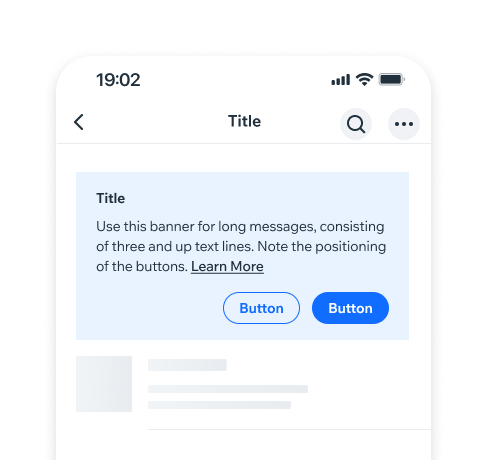
- Overview
- Dev
Usage examplesTopBar behavior and style are identical in both, iOS and Android.
Types
A few banner types are available. Refer to UX Guidelines for usage info.
| Type | Banner (regular) | Banner Large |
|---|---|---|
| Inline banner Used mostly for component or section-related messages. Inline Banners can be positioned before or after a section/component. | ||
| Full-width banner Used mostly in an entire screen context. Full-Width Banners can be positioned on top or on the bottom of the screen. They can be sticky, or disappear on scroll. |
PresetsEach preset should be used according to the message severity.
| Preset | Preview |
|---|---|
| Primary Used for a product messages mostly. | |
| Minor A more subtle variation of the Primary banner. Used for general messages. | |
| Success Can be used for various positive or reassuring messages. | |
| Major Used for various warnings. | |
| Critical Used for critical messages, these requiring user response and action. | |
| Premium Used for premium products. | |
| Blocker Blocker - use for “blocking” messages only, to notify users if and why they can’t proceed with various actions. |
AccessoriesAccessories displayed on the components right.
| Accessory | Banner | Preview |
|---|---|---|
| Button Inline banner uses Button Small | ||
| Link Button | ||
| Spinner | ||
| Chevron | ||
| None |
Accessories displayed on the components left.
| Accessory | Inline | Full-width |
|---|---|---|
| General icons Inline banner uses small icons (16x16) | ||
| Close/Dismiss icon Inline banner uses small icons (16x16) |
Banner Large AccessoriesAccessories displayed on the components right.
| Right accessory | Preview |
|---|---|
| Button Inline banner uses Button Small | |
| Button Secondary Inline banner uses Button Small | |
| Button Primary + Button Secondary Inline banner uses Button Small | |
| “Close”/”Dismiss” icon | |
| “Close”/”Dismiss” icon with Chevron | |
| Chevron only | |
| Spinner | |
| None |
Accessories displayed on the components left.
| Accessory | Inline | Full-width |
|---|---|---|
| General icons Inline banner uses small icons (16x16) |
Banner text optionsDepending on the use case, the following can be used:
| Text options | Preview |
|---|---|
| Title, message, link | |
| Title and message | |
| Message only |
SpecBanner spacing and measurements.
New Item
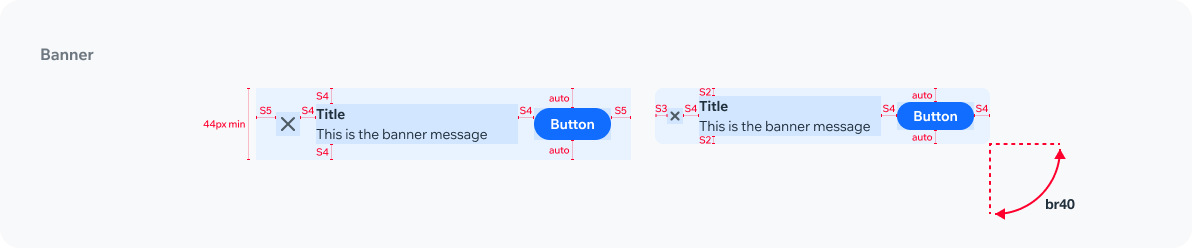
New Item
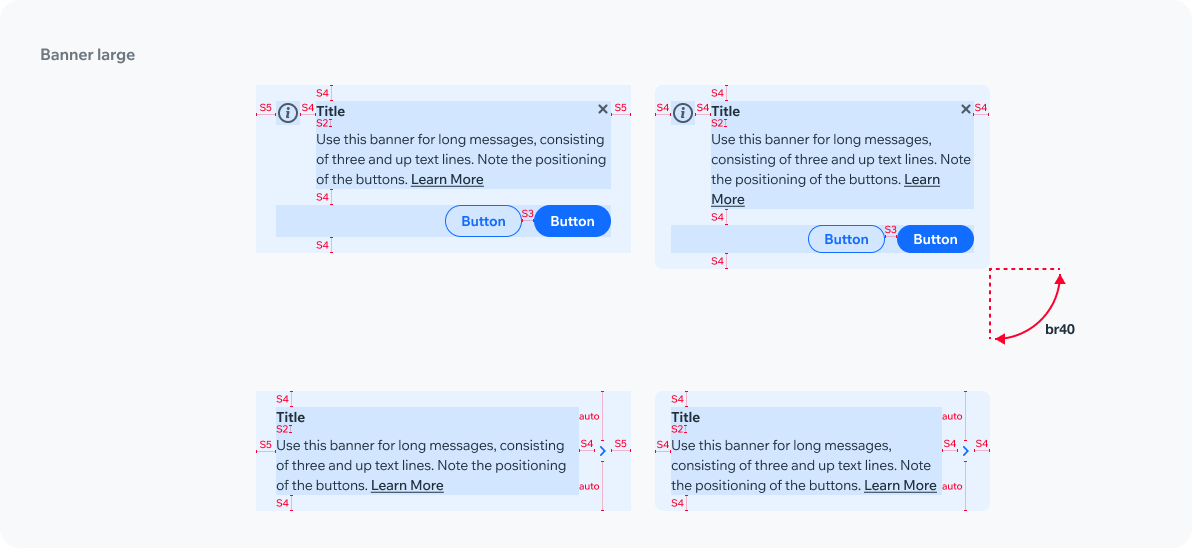
New Item
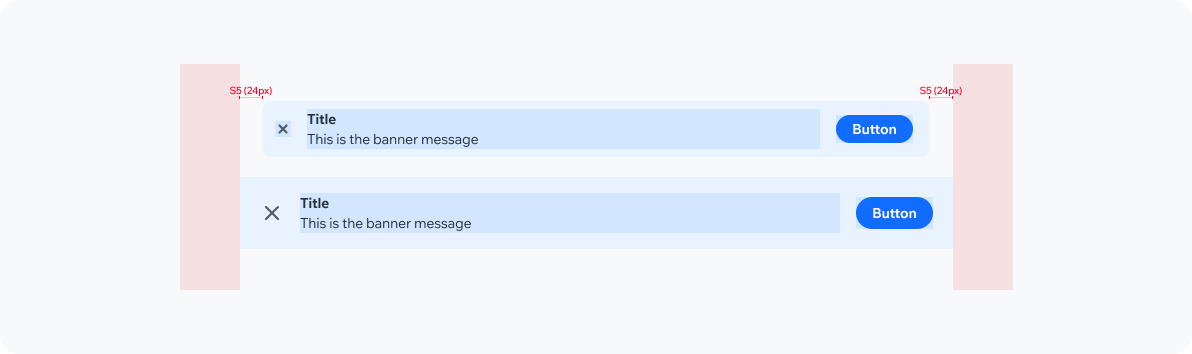
PlaygroundCode Example
APIThis is the list of additional props for the component