ImageRenders images responsively, offers an optional contrast overlay, and displays placeholder on load errors.
- UX Guidelines
- Overview
- Dev
Image OverlaysOverlays are added on top of an image in cases when extra contrast is needed to increase legebility of the content above the image.
Usage Examples
Types
| Type | Preview |
|---|---|
| Black Overlay (default) | .png) |
| White Overlay |  |
Overlay Types
| Type | Black Overlay (default) | White Overlay |
|---|---|---|
| Gradient Top markdown: **Black height:** 75% of image **White height:** 70% of image |  |  |
| Gradient Bottom markdown: **Black height:** 75% of image **White height:** 70% of image |  |  |
| Gradient Both markdown: **Black height:** 40% of image **White height:** 50% of image | 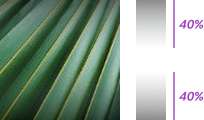 |  |
| Flat Overlay markdown: **Black opacity:** 45% **White opacity:** 40% |  |  |
Overlay intensity
| Property | Black Overlay (default) | White Overlay |
|---|---|---|
| Low Intensity Image: GradientOverlay.png |  |  |
| Medium Intensity image: GradientOverlayMedium.png |  |  |
| High Intensity Image: GradientOverlayHigh.png |  |  |
Image ErrorAdd a fallback to the Image component that displays the “placeholderMissingImage” illustration, in one of the following scenarios:
- URL is invalid (broken)
- Image that is not cached + offline mode
- Failed fetching from server
Usage Examples
Spec
PlaygroundCode Example

INFO
This component support margin modifiers.

TIP
This component extends the Image props.
APIThis is the list of additional props for the component